

Not a single business decides to drown in spreadsheets.
It happens one tab at a time. One extra column. One formula that only Sarah understands. Until the day you open the file and realise you're spending more time managing the tool than doing the actual work.
And by then, you're not quite sure how you got here.
The data is probably right, but you're not completely certain, and that uncertainty has started to matter.
According to QuickBooks, 71% of small businesses still use spreadsheets or paper to manage some aspects of their finances.
That number isn't surprising. What is surprising is how long most businesses wait before admitting the tool has stopped working for them.
Don't get me wrong - spreadsheets are great
Excel and Google Sheets are genuinely brilliant tools. Flexible, fast, available on every device, understood by almost everyone. Most businesses couldn't have gotten off the ground without them.
Someone once wrote that spreadsheets are "today's pen and paper."
That's exactly right. They're familiar, instant, and good enough for most things.
The question isn't whether spreadsheets are good.
The question is whether they're still the right tool for what you're trying to do.
What people who actually use Excel every day say
There's a thread on Reddit's r/excel community, a forum where Excel power users, corporate analysts, and developers share tips and war stories, that's worth thinking about.
Someone asked what actually slows Excel down in real corporate files.
The answers were technical, but one comment with over 100 upvotes cut through all of that:

Another person described their reporting process in nine steps.
PowerBI exports to Excel, someone pastes that into a larger file, helper columns and lookups are added, pivot tables are built, those feed other formula-based tables, everything gets summarized into a higher-level table, and at the very end, a screenshot of that table gets put into an email.
After writing it all out, they added:
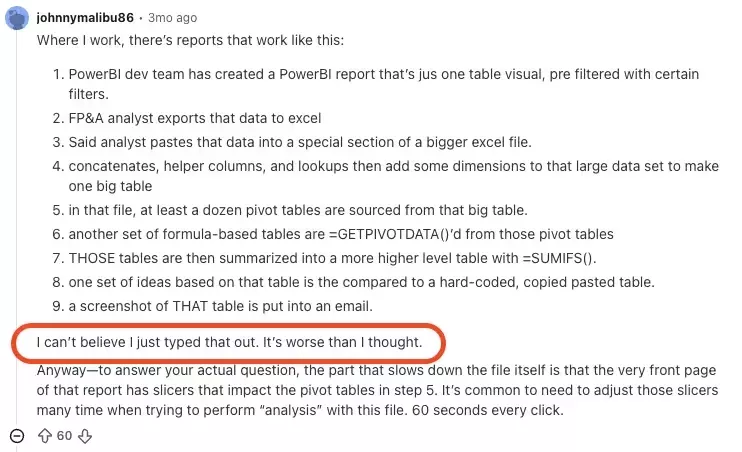
Nobody designed that process.
It grew, one workaround at a time, because each step felt like the simplest solution in the moment. That's how most spreadsheet problems develop.
Not through bad decisions, but through good decisions that compound over time.
When the tool stops fitting the work
There's one situation where spreadsheets break down most consistently: when the work happens away from a desk.
Not long ago, we spoke with the CEO of a hotel group in Norway.
During the conversation, he pulled up an Excel sheet on his laptop, a table tracking the cleaning status of different apartments after a large event. Which rooms were done, which had issues etc.
The spreadsheet looked fine. Organized, color-coded, clearly maintained.
But as we talked, a question came up:
How did the data actually get in there?
It turned out the cleaning staff weren't entering it themselves.
The data was probably coming from paper checklists, a shared chat, or someone collecting updates verbally, and then being entered into Excel by someone else.
By the time the CEO looked at his screen, he was seeing information filtered through at least one extra step, and possibly more.
The spreadsheet wasn't the problem.
The gap between what was happening on the floor and what appeared on the screen was the problem.
This isn't just hotels
The same pattern shows up across many industries, whenever the people doing the actual work are somewhere that isn't a laptop.
- A service technician drives to a client, inspects a piece of equipment, fills out a paper protocol. Back at the office, someone enters it into a spreadsheet. The manager sees the data the next day.
- A construction site coordinator takes photos of issues on their phone, sends them to a WhatsApp group, and someone at the office manually logs them.
- A delivery driver collects a signature on paper, and a stack of those forms gets entered into Excel at the end of the week.
In all of these cases, data travels through people before it reaches the screen.
Every handoff is a delay. Every handoff is a chance for something to be lost, forgotten, or entered wrong.
If you're sitting at a desk all day, a spreadsheet is probably fine.
The moment your work moves away from a desk, something breaks.
Other signs you've outgrown it
Work in the field is the most obvious trigger, but not the only one. A few others worth recognizing:

More than one person editing the same file. Conflicts happen. Data gets overwritten. Someone's update disappears. The more people involved, the more this becomes a daily frustration rather than an occasional nuisance.
More than one version of the file floating around. "Final," "Final v2," "Final USE THIS ONE." Decisions get made on the wrong version. Data gets entered twice. The cost isn't just time, it's the decisions made on bad information.
Reporting that takes hours every week. If someone on your team spends meaningful time pulling data together, cleaning it, and formatting it into something readable, that work could be automated. It's not adding value, it's compensating for a structural gap.
Protecting the file from the people who use it. Locking cells, adding dropdowns, writing instructions for how to fill it in correctly. When this becomes routine, the spreadsheet wasn't built for this many people or this much complexity.
What actually changes when you move to an app
A mobile app built around your workflow doesn't just digitize the spreadsheet.
It closes the gap.
Field teams enter data where they are.
Validations catch mistakes at the point of entry.
Managers see updates in real time.
Reports generate automatically.
Everyone works from the same version of the truth.
That said, the transition is rarely as simple as it sounds. A spreadsheet that's been in use for years carries edge cases, workarounds, and logic that lives in people's heads and nowhere else.
Understanding all of that before you start building is what separates a successful transition from one that costs twice as much and takes twice as long.
The mistake most businesses make
They move too fast.
They hire a developer, describe what the spreadsheet does, and ask for an app that does the same thing. Three months later they have an app that works exactly like the spreadsheet, with all the same limitations, just in a different format.
The better question isn't "how do we build an app version of this?"
It's "what were we actually trying to achieve, and what's getting in the way?"
Sometimes the answer is a mobile app.
Sometimes it's a different process.
Sometimes it's a simpler tool than anyone expected.
The point is to figure that out before anyone writes a line of code.
Before you decide anything
That's what a Discovery Workshop is for.
We work through your specific situation, what you're actually trying to solve, what version one needs to include, and what can wait. No pitch, no proposal before we understand the problem.
Just a clear picture of what to build and why, so you can make a decision you'll stand behind.
If it turns out you need an app, you'll know exactly what kind and why. If it turns out you don't, you'll know that too.